
Customerly's Flows give you complete control over how and when automated conversations start. Sometimes, you may want a flow to trigger only when a customer's message includes specific words or subjects — such as "pricing," "refund," or "demo."
You can achieve this by setting content filters in your flow trigger.
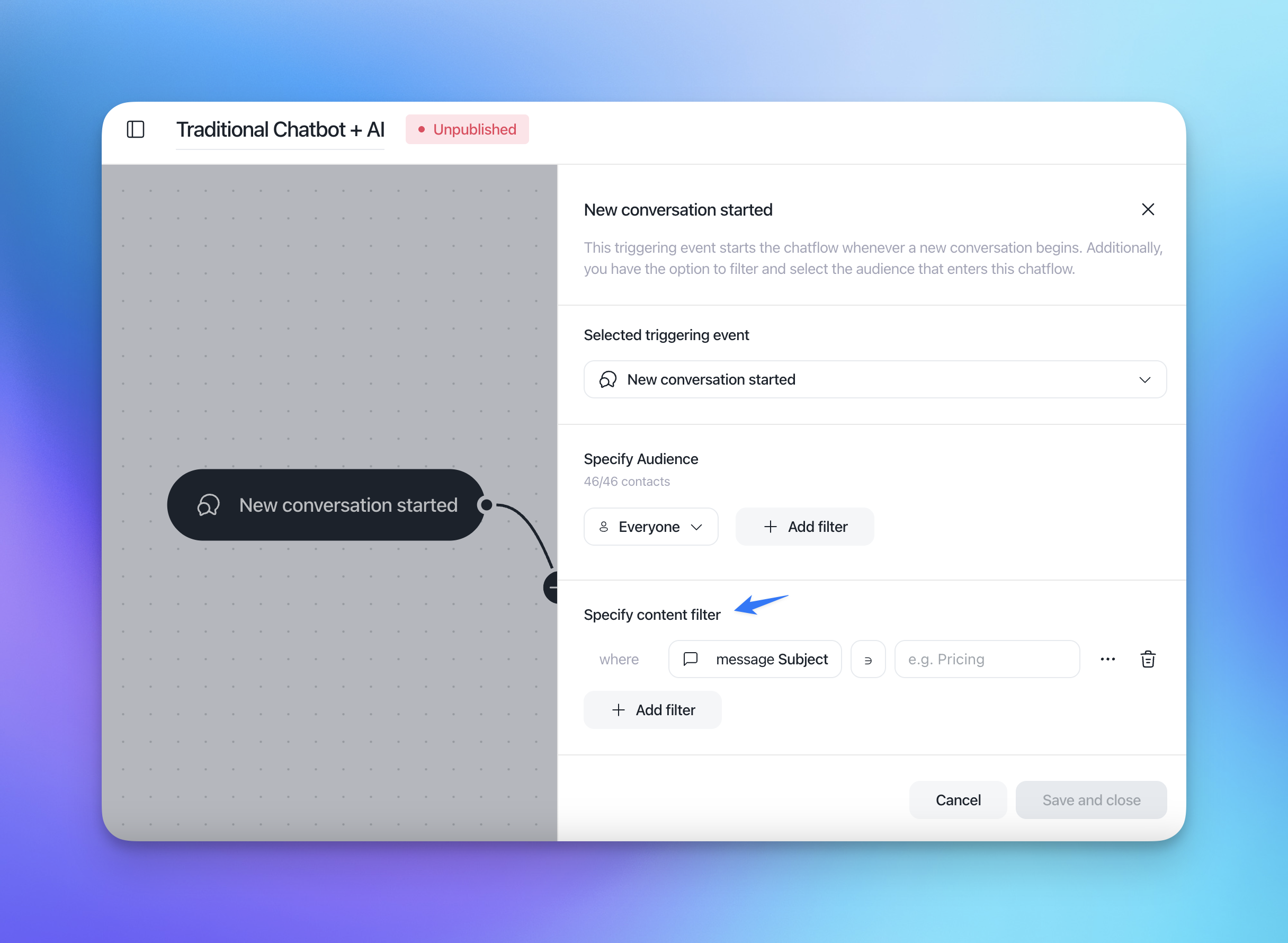
Step-by-step guide
1. Open your Flow
From your Customerly dashboard, go to Flows and open the one you want to edit. If you're creating a new flow, choose New Flow and select your preferred template (e.g., "Traditional Chatbot + AI").
2. Select your trigger event
In the left panel, select New conversation started (or another event that fits your use case). This defines when the flow should begin — for example, whenever a new chat is initiated.
3. Specify your audience
Under Specify Audience, you can choose whether the flow should apply to:
Everyone, or
A specific audience segment (by clicking Add filter to select based on tags, properties, or events).
4. Add a content filter
Scroll to the section Specify content filter. This filter allows you to define conditions based on the customer's first message.
Click Add filter.
Choose between Content or Subject:
Content filters by words within the body of the customer's message.
Subject filters by the subject line (useful for email-triggered conversations).
Select your operator (for example, contains, is, starts with).
Enter your keyword or phrase (e.g., "pricing," "refund," "technical issue").
For instance:
where message content contains "refund"
This setup ensures the flow will trigger only when a customer's message includes "refund."
5. Save and publish
Once your filters are configured, click Save and close. When ready, Publish your flow so it starts working automatically.
Example use cases
Sales inquiries — Trigger a flow when a message includes "pricing" or "quote."
Support requests — Launch an AI-assisted flow when users mention "error," "bug," or "issue."
Refund requests — Start a refund-intent flow when the word "refund" appears in the message.
Pro tips
Combine content filters with audience filters to make flows even more precise.
Regularly review the words customers use most in conversations to improve your filters.
Use AI Intents alongside content filters for even smarter routing and automation.
The flow with no content filter might still match a conversation while here is another flow with the content restriction, this is the concurrency restrictions.